DAM vs. Dropbox
Dropbox and DAM solve different problems. Here's what a DAM actually does, how it compares to Dropbox, and how to know which one your team needs.

Growing brands often start with Dropbox for managing their content, but as asset production scales and teams expand, the cracks start to show. Folders multiply, naming conventions drift, and version control becomes a guessing game. When teams go looking for a fix, they often find they need a different category of tool entirely. This guide breaks down where Dropbox falls short and what a DAM system does differently.
DAM vs. Dropbox at a glance
A DAM platform stores, organizes, searches, manages, and distributes your brand’s images, videos, graphics, and brand content. A DAM sits at the center of a team’s content operations, making sure the right people can find the right asset in seconds, that only current approved content is in circulation, and that brand standards hold across every channel and collaborator. For a deeper look at what DAM includes, see the full guide to digital asset management.
Dropbox is a cloud-based file syncing service that lets you store files online and access them from any device. It automatically syncs files across your computers, phones, and tablets. Dropbox offers collaboration features like shared folders, file commenting, and integrations with tools like Google Docs and Microsoft Office. When examined side by side, it’s easy to tell that the two platforms are built for different jobs: dynamic asset management versus synchronized file storage.
DAM vs. Dropbox feature comparison
The table below compares DAM vs. Dropbox across the categories most relevant to buyers evaluating content management and access solutions.
| Feature | DAM | Dropbox |
|---|---|---|
| Search | AI visual search across images and video; hybrid search combining visual recognition and metadata; plain language queries; finds assets with no metadata | Filename and keyword search; No AI-powered search; relies on filenames and manually applied metadata |
| Asset organization | AI-assisted tagging, auto-tagging, and taxonomy-aware categorization that scales with content volume and team size | Manual folder structure; organization depends entirely on team discipline and naming conventions, which tend to break down as content volume grows |
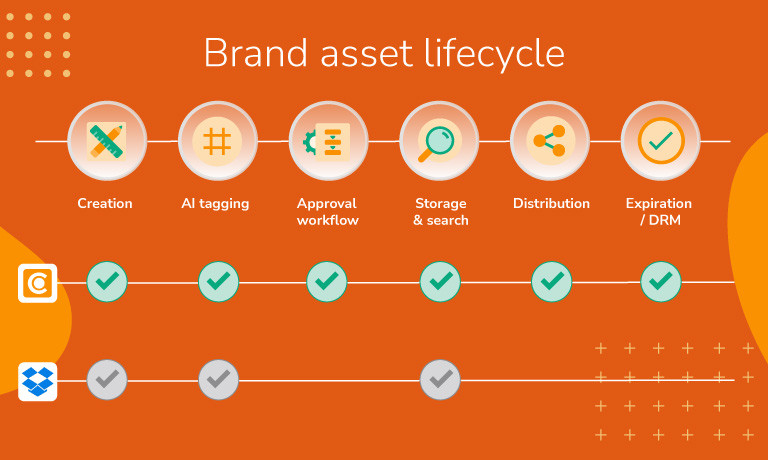
| Brand governance | Expiration dates, approval workflows, style guides, and portals keep brand standards enforced across every touchpoint | Viewing and editing permissions available, but no tools to manage asset lifecycle, enforce approvals, or control how assets are used once shared |
| Digital Rights Management(DRM) | DRM features let teams attach usage terms and licensing conditions to individual assets or set expiration dates add customizable watermarks to protect sensitive assets | No native DRM; watermarking available for images and PDFs |
| Version control | Single current version surfaces to users so teams always work from the right file; full history preserved in the background | File versioning available, but previous versions remain accessible and indistinguishable without clear naming conventions in place |
| Analytics | Asset-level usage data including downloads, shares, search terms, and engagement | File activity available through admin tools, focused on user behavior rather than how individual assets are performing |
| Permissions | Granular role-based access control at the folder, album, and individual asset level; single sign-on, multi-factor authentication, and audit logs included | Sharing permissions and access controls available; suitable for general collaboration but not built for the complexity of multi-team brand asset access |
Search: Find anything in seconds, not hours
For busy teams, search is not a convenience feature; it’s the difference between a library that works and one that increases costs through duplicated work and missed deadlines. The faster teams can find the right asset, the faster content gets to market.
DAM
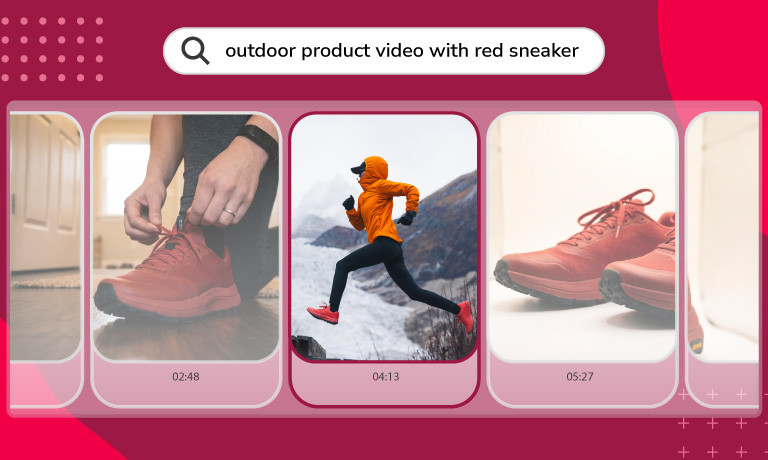
A modern DAM can find assets the way people actually look for them. AI visual search combines visual recognition, natural language processing, and your organization’s existing metadata in a single query. For video, that same capability scans every frame using object detection, contextual analysis, and audio transcription, letting teams jump directly to the relevant timestamp inside a clip without watching the full file. If you prefer searching by file specs, you can use filters to zero in on the exact file you want based on metadata.
Dropbox
Dropbox search works by matching filenames and any text it can extract from documents. For teams managing large libraries of images and video, search returns what was named at upload. If the file was saved as IMG_4837.jpg during ingestion, it stays lost.
Brand governance and workflows: Integral to key DAM functionality
Brand consistency depends on more than having the right assets available. It relies on making sure the wrong ones are not, and that’s a problem file storage platforms like Dropbox were never designed to solve. DAM solutions were engineered for this from the start.
DAM
A comprehensive DAM makes brand management structural rather than aspirational. Asset expiration dates automatically retire content on a set schedule. Digital Rights Management attaches usage terms to individual files that must be accepted before download. Watermarking protects sensitive assets. Approval workflows route new content through structured review before it enters the main library. External branded portals give agencies, partners, and vendors curated access to exactly what they need, with permissions that can be set specifically and revoked cleanly when a project ends. Marketing and operations teams manage all of this directly, without IT involvement, because the permission model is designed for the people who own the content.
Dropbox
Dropbox offers viewing and editing permissions and shared drive controls that give organizations meaningful access management, but asset lifecycle controls, expiration, DRM, and approval workflows are all absent from core capabilities.
AI: Intelligent features that streamline how your team works
A content library is only as useful as it is organized, and at scale, content libraries cannot depend on manual organization alone. Teams change, conventions drift, and the tagging discipline that worked at a few hundred assets rarely holds at tens of thousands.
DAM
A modern DAM weaves AI throughout the platform to make every operation faster. Auto-tags identify and label visual content automatically at upload, so new assets arrive organized rather than landing in an unsorted inbox. Modern DAMs like Canto offer AI Library Assistant which learns your organization’s existing taxonomy, how assets are already named, tagged, and categorized, and applies that understanding to new uploads consistently.
Dropbox
Dropbox has incorporated AI capabilities through its broader product suite, oriented primarily toward document productivity and collaboration workflows, but these are not built for visual asset discovery and do not close the gap for teams managing large libraries of images, video, and creative files.
What are the use cases for DAM vs. Dropbox?
| Use case | DAM | Dropbox |
|---|---|---|
| Document storage and collaboration | ✓ | |
| Intelligent organization | ✓ | |
| AI-powered search | ✓ | |
| Video discovery and frame-level search | ✓ | |
| Brand governance | ✓ | |
| Workflows and integrations | ✓ |
Document storage and collaboration: For Word files, PDFs, and general working documents, Dropbox offers file sync, version history, and broad sharing controls. But if your content extends beyond documents into images, videos, audio, and brand assets, Dropbox’s storage capabilities fall short of what a DAM is built to handle.
Intelligent organization: A DAM automatically categorizes uploads, suggests metadata based on your existing taxonomy, and applies bulk actions across large libraries, so content stays organized as it grows. Dropbox relies on manual folder structures and user discipline, with no AI-assisted categorization to keep pace as content volume scales.
AI-powered search: A DAM surfaces assets based on what is visually inside them, so teams can find what they need in plain language without relying on perfect file naming or manual tagging. Dropbox has no equivalent capability for rich media, meaning assets that were not named or tagged correctly at upload are difficult to surface reliably.
Video discovery and frame-level search: A DAM scans video frame by frame, enabling teams to search inside clips, jump to specific moments, and surface relevant footage without scrubbing through files manually. Dropbox can store and play video but has no understanding of what is happening inside a clip or how to navigate to a specific moment without watching it in full.
Brand governance: From Digital Rights Management and asset expiration to external brand portals and approval workflows, a DAM makes brand governance a native part of how the platform works. Dropbox’s permission model is built for access control rather than asset lifecycle management, so governance depends on manual processes rather than platform enforcement.
Workflows and integrations: A DAM is built around the full content lifecycle, with native integrations across creative, marketing, and e-commerce tools, so assets move through workflows without manual handoffs. Dropbox integrates with a broad range of productivity tools but is not purpose-built for the creative and marketing stack.
The bottom line on DAM vs. Dropbox
Dropbox and a purpose-built DAM are not interchangeable, and the difference compounds quickly at scale. As content volume grows, as more teams need access, and as distribution becomes more complex, the gap between what platforms like Drobox offer and what brand asset management actually requires becomes an issue. Many teams arrive at this problem looking for a better folder system and leave realizing they need a different category of tool entirely.
When it comes to experience, scale, and capability, Canto is the original DAM pioneer with 30+ years of dedicated expertise and 4,000+ brands worldwide.
Canto DAM is built around the full content lifecycle. AI Visual Search and frame-level video discovery mean teams find what they need in seconds rather than minutes. AI Library Assistant and Smart Tags keep the library organized as it grows, without the manual overhead that compounds alongside content volume. Brand governance tools including asset expiration, Digital Rights Management, watermarking, and approval workflows ensure only current, approved content reaches teams and partners. And with a 90%+ native integration library spanning Adobe Creative Cloud, Slack, Salesforce Marketing Cloud, Shopify, Amazon, and more, assets move through workflows without manual handoffs. Canto Academy adds DAM-specific training and strategy resources from day one, and for product-driven brands, Canto DAM for Products connects creative assets directly to product information and syncs with Shopify and Amazon with no separate integration to maintain.
Marketing teams get a true Dropbox alternative, without the broken searches, the outdated assets still in circulation, or the re-created work that comes from trying to run brand operations on a tool that was never built for it.
More resources
DAM vs. Dropbox frequently asked questions
What is the core difference between a DAM and Dropbox?
A DAM is purpose-built to organize, search, govern, and distribute brand assets at scale. It understands what is visually inside your content and gives marketing teams the tools to control how assets are used across their full lifecycle. Dropbox is a basic storage and file sync platform built for keeping files accessible across teams and devices.
When does it make sense to move from Dropbox to a DAM?
When the primary friction points in your content workflow are search, governance, and distribution at scale. If teams are spending significant time locating assets, if outdated content is circulating, or if managing external collaborator access has become difficult to control consistently, a DAM is designed to solve those problems directly.
What governance tools does a DAM provide that Dropbox does not?
A DAM provides asset expiration dates, Digital Rights Management with per-file terms of use, watermarking, approval workflows, and external brand portals with access that can be scoped and revoked at the project level. These capabilities are native to the platform and managed by marketing and operations teams without IT involvement.
Can a DAM and Dropbox be used together?
A DAM is purpose-built for brand asset management at scale and addresses a different set of problems than file sync and document storage. Teams that have outgrown Dropbox for managing brand content typically find that a DAM replaces it for that specific job rather than running alongside it.
Is there a Dropbox alternative built specifically for marketing teams?
DAM platforms like Canto are purpose-built for marketing and creative teams managing brand assets at scale. Canto connects with cloud storage tools, so teams can use it as the operational hub for brand content while keeping existing file storage workflows in place.
