DAM vs. SharePoint
What's the difference between DAM vs. SharePoint? One is a powerful brand asset management system; the other handles text-based documents. Learn what defines each and how they work together.

Growing teams often start with SharePoint for file storage, then hit a wall when content production scales. When they go looking for a SharePoint alternative, they find what they need is a different category of tool entirely: DAM software. This guide highlights where the two platforms diverge, so you can make the right call for your team.
DAM vs. SharePoint at a glance
A DAM platform stores, organizes, searches, manages, and distributes your brand’s images, videos, graphics, and brand content. It treats each file not as something to be stored, but as an asset to be understood, organized intelligently, and activated across channels. For a deeper look at what DAM includes, see the full guide to digital asset management.
SharePoint is built for a different job: document management, team sites, and structured collaboration on Word files, PDFs, and spreadsheets within the Microsoft 365 ecosystem. It can technically store images and videos, but storing rich media and managing it effectively at scale are two very different things, and the gap becomes impossible to ignore as content libraries grow.
DAM vs. SharePoint feature comparison
The table below compares DAM vs. SharePoint across the categories most relevant to buyers evaluating content management and access solutions.
| Feature | DAM | SharePoint |
|---|---|---|
| Search | AI visual search across images and video; hybrid search; facial recognition built in; reverse image search | No AI-powered search; relies on filenames and manually applied metadata |
| Asset organization | AI-assisted metadata based on existing taxonomy, AI-assisted categorization for new uploads at scale, auto-tagging, custom metadata fields, keywords, and tags | Folder and document library structure; requires strict administrative discipline; no AI-assisted categorization |
| Brand management capabilities | Portals, brand templates, style guides, expiration dates, download controls, approval workflows, versioning | Unable to track and manage brand assets across channels, basic workflow tools available, complex flows require Power Automate configuration or development work |
| Digital Rights Management (DRM) | DRM features let teams attach usage terms and licensing conditions to individual assets or set expiration dates; watermarks can be added to sensitive content | DRM is available but requires IT setup and applies at the library level, not to individual assets; No native watermarking |
| Analytics & reporting | Built-in asset-level usage insights: downloads, shares, engagement, search terms | Usage reporting through Microsoft 365 admin center; focused on user activity rather than asset-level performance |
| Security & permissions | Granular role-based access controls at folder, album, and asset level; single sign-on, multi-factor authentication, audit logging | Single sign-on, multi-factor authentication, role-based access controls available; complex permission configurations typically require IT involvement |
Search: DAM finds what you need, SharePoint finds what you named
Search is where the gap between a DAM and SharePoint becomes most visible. A DAM is built to find assets the way people actually look for them. SharePoint is built to find documents the way they were filed.
DAM
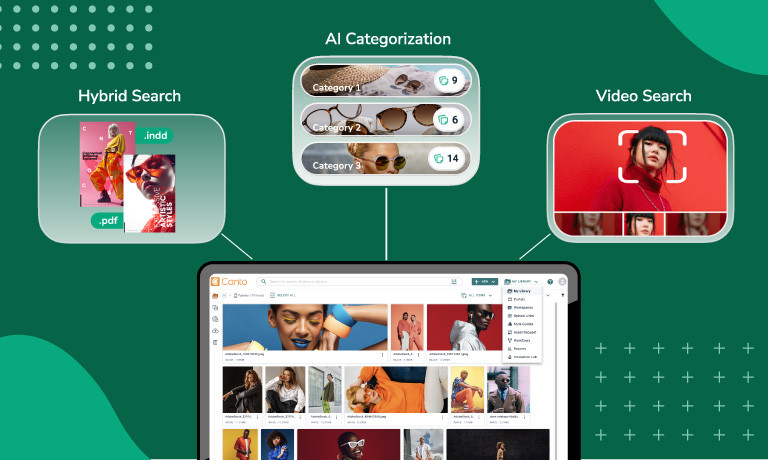
A comprehensive DAM solution is built for search at scale. AI-powered visual recognition, natural language queries, and your organization’s existing metadata work together so teams can describe what they are looking for in plain language and surface the right result instantly, even from assets that have never been manually tagged. For video, modern DAM solutions go even further: AI scans content frame by frame using object detection, contextual analysis, and audio transcription, surfacing the most relevant clip with jump-to-timestamp navigation. It understands what is visually inside an image or video, not just what someone typed into a filename. If you prefer searching by file specs, you can use filters to zero in on the exact file you want based on metadata.
SharePoint
SharePoint search is optimized for text documents, not media libraries. When someone needs a product image or campaign video, they must know exactly what the file was named and hope whoever uploaded it used the same terminology. Video is stored through Microsoft Stream and made playable, but you cannot search for what is visually happening inside a clip, jump to a specific moment, or surface related footage from across the library. Across a library of thousands of assets, that kind of coordination reduces productivity across teams.
Brand governance and workflows: Built in, not bolted on
Governance and workflows are either native to the platform, or they become someone else’s IT project. A DAM is designed around the content lifecycle from the start. SharePoint isn’t.
DAM
A comprehensive DAM includes brand governance and content workflows as standard. External-facing portals for partners and agencies, asset expiration controls, watermarking, structured approval workflows, upload links with enforced metadata, annotations, and versioning are all built into the platform. Digital Rights Management at the individual asset level means that DAM platforms can meet specific compliance requirements. And upload, review, approval, and distribution are native to the system, so teams can move assets through the full content lifecycle without manual handoffs or re-uploading files at every stage. All of it is configurable and managed by the teams who own the content without involving IT.
SharePoint
SharePoint can host a page that resembles a brand hub, but making it functional for real governance requires custom development, Power Platform configuration, and sustained IT ownership. Workflow capabilities exist through Power Automate, but building anything beyond simple approval routing requires configuration and, in more complex cases, development work. Every capability a DAM delivers by default must be assembled from parts in SharePoint, and each part adds complexity that shows up as IT tickets and delayed updates.
AI: Intelligence woven into the platform to manage content at scale
AI is a key factor in what separates a modern DAM from basic file storage. SharePoint is built for document productivity. A DAM is built to manage rich media at scale, and AI is central to how it does that.
DAM
Modern DAM solutions are purpose-built to manage content at scale using AI. Auto-tagging, text and facial recognition, transcription, and multi-language support are core to how a leading DAM organizes and surfaces assets across a library of thousands or millions of files. Rather than relying on manual metadata entry or perfect file naming, a comprehensive DAM uses AI to keep libraries organized, searchable, and consistent from upload through distribution, without the manual intervention that breaks down as content volume grows.
SharePoint
SharePoint does not offer AI capabilities built around media and brand asset management. Microsoft 365 includes general AI tools through Copilot, but these are built for document productivity, not for organizing, searching, or activating a library of images, videos, and brand content at scale.
Does DAM and SharePoint work together?
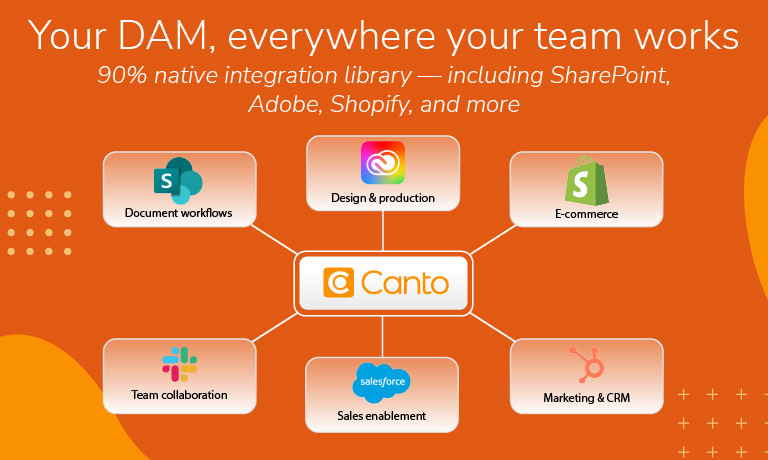
Yes, and this is important context for teams evaluating SharePoint vs. DAM. Moving to a dedicated DAM does not mean walking away from SharePoint. Some DAM platforms integrate directly with Microsoft SharePoint, so organizations can keep using it for document-heavy workflows while the DAM takes ownership of brand assets.
Brand assets live in the DAM where they are searchable, governable, and ready for distribution. Document workflows continue in SharePoint. There are no duplicate files, metadata stays connected to the assets, and teams always share the current version.
With an integration in place, teams can use the DAM as the central location for all brand assets while working within their existing SharePoint environment simultaneously. The two systems work together rather than in competition.
What are the use cases for DAM vs. SharePoint?
| Use case | DAM | SharePoint |
|---|---|---|
| Document storage | ✓ | |
| Intelligent organization | ✓ | |
| AI-powered search | ✓ | |
| Video workflows | ✓ | |
| Brand governance | ✓ | |
| Workflows and integrations | ✓ | |
| Microsoft Suite collaboration | ✓ |
Document storage: For Word files, PDFs, and spreadsheets, SharePoint is a capable solution with version history, co-authoring, and tight integration across the Microsoft 365 suite. But, if your content extends beyond Microsoft file types into images, videos, audio, and brand assets, SharePoint’s storage capabilities fall short of what a DAM is built to handle.
Intelligent organization: DAM platforms automatically categorize uploads, suggest metadata based on your existing taxonomy, and apply bulk actions across large libraries, so content stays organized as it scales. SharePoint relies on manual folder structures and user discipline, with no AI-assisted categorization to keep pace as content volume grows.
AI-powered search without metadata: A DAM surfaces assets based on what is visually inside them, so teams can find what they need in plain language without relying on perfect file naming or manual tagging. SharePoint has no equivalent capability for rich media, meaning assets that were not named or tagged correctly at upload are effectively lost.
Video workflows: A DAM scans video frame by frame, enabling teams to search inside clips, jump to specific moments, and surface related footage without scrubbing through files manually. SharePoint can store and play video, but there is no way to search what is happening inside a clip or navigate to a specific moment without watching it in full.
Brand governance: From Digital Rights Management and asset expiration to external portals and approval workflows, a DAM makes brand governance standard rather than a custom IT project. In SharePoint, each of these capabilities requires separate configuration or development work, and the result is a governance model that depends on IT rather than the teams who own the content.
Workflows and integrations: DAM platforms are built around the full content lifecycle, with native integrations across creative, marketing, and e-commerce tools, so assets move through workflows without manual handoffs. SharePoint integrates deeply within Microsoft 365 but connecting it to the broader creative and marketing stack requires third-party connectors, custom development, or both.
Microsoft Suite collaboration: If your team lives in Teams, Outlook, and Office, SharePoint is the natural home for collaborative document workflows. A DAM is not designed to replace that, and the two platforms work best when each handles the content type it was built for.
The bottom line on DAM vs. SharePoint
SharePoint and a purpose-built DAM are not interchangeable, and the difference compounds quickly at scale. SharePoint was built for documents, and the further you push it into brand asset management territory, the more complexity you are taking on without actually solving the problem.
Many teams arrive at this issue looking for a workaround and leave realizing they need a dedicated tool built for managing brand assets at scale. Choosing the right DAM matters, and when it comes to experience, scale, and capability, Canto is the original pioneer with 30+ years of dedicated expertise and 4,000+ brands worldwide.
Canto DAM delivers everything from hybrid visual search and frame-level video discovery to brand governance and a 90% native integration library that connects the creative and marketing tools your team already uses. Canto Academy adds DAM-specific training and strategy resources from day one. For product-driven brands, Canto DAM for Products connects creative assets directly to product information and syncs with platforms like Shopify and Amazon, with no separate integration to maintain.
Paired with SharePoint for document collaboration, Canto gives every part of your organization the right home for their content. Marketing teams get a true SharePoint alternative for marketing asset management using Canto.
More resources
DAM vs. SharePoint frequently asked questions
Are DAM and SharePoint interchangeable?
No. SharePoint is built for document management and collaboration within Microsoft 365. A DAM is built to store, organize, search, manage, and distribute rich media at scale. The difference matters most for content like images, videos, audio files, graphics, and other common brand asset types.
Can SharePoint be used as a DAM?
SharePoint can store image and video files, but storing rich media and managing it effectively at scale are two very different things. As content libraries grow, the gap between what SharePoint can do and what a DAM is built to do becomes impossible to ignore.
Do DAM and SharePoint work together?
Yes, and for most growing organizations that is the right setup. A DAM takes ownership of brand assets while SharePoint continues handling document workflows. There are no duplicate files, metadata stays connected to the assets, and teams always share the current version.
What does a DAM do that SharePoint cannot?
A DAM finds assets based on what is visually inside them, scans video frame by frame for searchable moments, manages Digital Rights Management at the asset level, and keeps libraries organized at scale using AI that learns your organization’s taxonomy. None of these are available in SharePoint without significant custom development.
When should you choose a DAM over SharePoint?
If your team manages high volumes of images, videos, graphics, or brand assets and needs a centralized system to store, organize, and distribute them at scale, a DAM is the right tool. SharePoint works well if your team primarily collaborates on documents and does not need advanced search or brand governance.
What is the best DAM to use with SharePoint?
Canto integrates directly with SharePoint and the broader Microsoft ecosystem, so brand assets and document workflows run side by side without duplicate files or broken metadata. With 30+ years of DAM expertise and 4,000+ brands worldwide, Canto is built to give every part of your organization the right home for their content.
