Google Drive vs. DAM
Google Drive is where brand assets go to get lost. Learn the real difference with Google Drive vs. DAM, and why fast-growing teams make the switch.
Teams often find themselves trying to use Google Drive to manage their brand assets, not because it’s the best option, but just because it was there from the start. As content production scales, more teams need access, and finding the right content becomes more like searching for a needle in a haystack; the makeshift systems’ holes start to show. This guide explains where Google Drive and a purpose-built DAM diverge, so you know what you need before the chaos compounds further.
Google Drive vs. DAM at a glance
Unlike a general-purpose file storage tool, a DAM platform is purpose-built to organize, search, govern, and distribute brand content specifically; treating every asset as something to be understood and activated, not just stored. Read the complete guide: What is digital asset management?
Google Drive is built for a different job: personal and team file storage with sharing across Google Workspace. It was designed around text documents, and it shows. Images and videos can live there, but the platform has no native understanding of what is inside them, no way to govern how they get used, and no structure that survives contact with a team that creates content at a significant volume.
Google Drive vs. DAM feature comparison
The table below compares Google Drive vs. DAM across the categories most relevant to buyers evaluating content management and access solutions.
| Feature | DAM | Google Drive |
|---|---|---|
| Search | AI visual search across images and video; hybrid search; facial recognition; reverse image search; find assets by describing what is in them | Filename and keyword search only; no understanding of visual content; find what you named, not what you need |
| Asset organization | AI-assisted metadata, auto-tagging, AI-assisted categorization at scale, organizational structure that adapt to how your team actually works | Manual folder structure only; organization depends entirely on whoever set it up and whether everyone follows the same conventions |
| Brand governance | Portals, brand templates, style guides, expiration dates, download controls, approval workflows | No native brand governance; sharing permissions exist but nothing prevents outdated assets from staying live or off-brand files from circulating |
| Digital Rights Management (DRM) | DRM features let teams attach usage terms and licensing conditions to individual assets or set expirations dates; add customizable watermarks to protect sensitive assets | No native DRM or watermarking capabilities |
| Analytics and reporting | Built-in asset-level usage insights: downloads, shares, engagement, search terms | No asset-level reporting; basic file activity available through Workspace Admin only |
| Security and permissions | Granular role-based access at folder, album, and individual asset level; single sign-on, multi-factor authentication, audit logging; sharing controls that marketing teams can manage without IT | Link-based sharing is difficult to audit at scale; permissions require manual discipline; external sharing can get out of control quickly |
Search: DAM searches how you think, Google Drive searches how files are named
Search is where the gap between file storage and asset management becomes impossible to ignore. When your library is small, finding what you need is mostly a memory exercise. But when it grows, it becomes an infrastructure problem without the right platform.
DAM
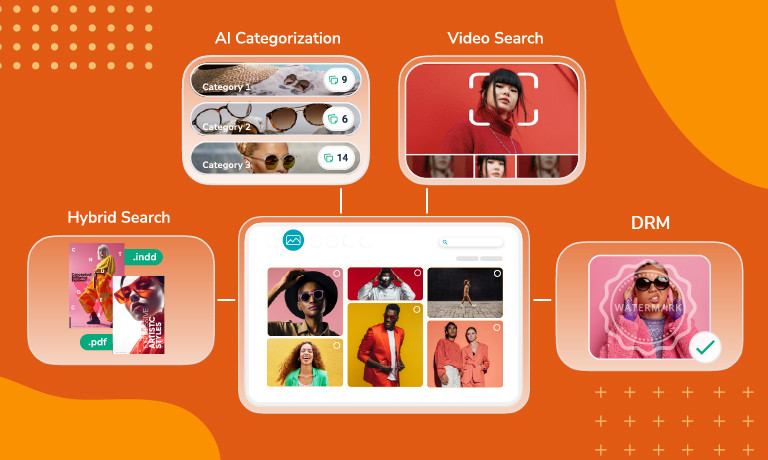
A modern DAM can find assets the way people actually look for them. AI visual search lets teams describe what they need in plain language and surface the right result instantly, even from assets that were never manually tagged. For video, it scans every frame using object detection, contextual analysis, and audio transcription, so teams can jump directly to the relevant timestamp without watching the full file. If you prefer searching by file specs, you can use filters to narrow in on the exact file you want based on metadata.
Google Drive
Google Drive search works by matching filenames and text it can extract from documents. For a folder of Word files or PDFs, that is adequate. For a library of images and videos, it means you will only find what was named correctly at upload. There is no way to search for “photo of the team at the Chicago event” and have Drive understand what is visually in the image.
Brand governance and workflows: The gap between file storage and dynamic content management
Brand consistency depends on more than having the right assets available. It hinges on making sure the wrong ones are not. DAM solutions have been engineered from the start to solve this issue, while file storage platforms like Google Drive, only offer the basics. As content libraries expand and teams grow, the cost of not having proper governance in place compounds quickly.
DAM
A modern DAM makes brand governance structural rather than aspirational. Asset expiration dates automatically retire content on a set schedule, Digital Rights Management attaches usage terms that must be accepted before download, and watermarking protects sensitive assets from misuse. Approval workflows keep new content in structured review until it is ready for the main library, and external portals give agencies, partners, and vendors curated access that can be scoped tightly and revoked cleanly when a project ends. Marketing and operations teams manage all of this directly, without IT involvement.
Google Drive
Google Drive’s permission model was designed for sharing files, not governing brand assets. Viewing and editing controls exist, but there is no way to set expiration dates, attach terms of use to individual files, apply watermarks, or build approval workflows without third-party tooling. Files stay live indefinitely, old versions pile up alongside new ones, and content shared externally for one campaign often stays accessible long after it ends. An ungoverned library means, at least, brand integrity erosion over time, or even worse, compliance mishaps with licensed content going out unchecked.
AI: Less time managing content, more time using it
Brand libraries often grow faster than the team managing it. What starts as a manageable folder structure becomes unwieldy the moment headcount shifts, campaigns multiply, or a new team comes on board with no context for how things are organized. That is where AI makes a real difference; maintaining structure automatically so libraries stay usable as they scale.
DAM
AI in a modern DAM runs throughout the platform, making everything faster and more consistent. Auto-tags apply labels at upload based on visual content. Modern DAMs like Canto offer AI Library Assistant learn your existing taxonomy and apply it to new assets automatically, so organization stays consistent with how your team actually names and categorizes content. Teams no longer depend on time-consuming conventions holding across every contributor, and AI Visual Search lets anyone describe what they are looking for in plain language and surface results instantly across images, video, and individual video frames.
Google Drive
Google Workspace includes Gemini for document-oriented tasks like drafting emails and summarizing documents, but it does not extend to understanding what is visually inside an image, organizing a media library, or surfacing the right asset based on a natural language description of its contents. Google Drive’s AI was intended for document workflows, not brand asset management.
Do DAM and Google Drive work together?
Yes, and for teams already living in Gmail, Docs, and Sheets, this matters. Moving to a dedicated DAM does not mean abandoning Google Workspace. The two platforms solve different problems and work well in parallel.
Brand assets, images, videos, campaign graphics, and approved content live in the DAM where they are searchable, governed, and ready for distribution. In-progress documents, presentations, and collaborative working files stay in Drive. Many DAM platforms integrate directly with Google Drive, so the transition is additive rather than disruptive.
What are the use cases for Google Drive vs. DAM?
| Use case | DAM | Google Drive |
|---|---|---|
| Document storage and collaboration | ✓ | |
| Brand asset organization at scale | ✓ | |
| AI-powered search | ✓ | |
| Video discovery and frame-level search | ✓ | |
| Brand governance and DRM | ✓ | |
| External partner access controls | ✓ | |
| Approval workflows | ✓ | |
| Google Workspace collaboration; | ✓ |
Document storage and collaboration: Google Drive works for Docs, Sheets, Slides, and any content that needs real-time co-editing within Google Workspace. If your content stays within Google file formats and your team is the primary audience, Drive is capable. If you work with images, videos, or any other kind of visual content, you need a DAM platform.
Brand asset management: Once your library includes images, videos, audio, and graphics that need to be found, governed, and distributed by multiple teams, Google Drive stops being adequate. A DAM provides the search, governance, and workflow infrastructure that Drive cannot.
Finding assets without perfect metadata: A DAM surfaces assets based on their visual content. Google Drive cannot. For any team managing a significant volume of visual content, DAM becomes a must.
Video discovery: A DAM scans video frame by frame, enabling teams to search inside clips, jump to specific moments, and surface relevant footage without watching files in full. Google Drive can store and play video but has no understanding of what is inside video content.
Brand governance: Expiration dates, watermarking, DRM, approval workflows, and external branded portals with controlled access are native to a DAM and unavailable in Google Drive without third-party tooling.
External collaboration: Google Drive handles everyday file sharing well enough, but it was not built for managing how external partners access brand assets. A DAM gives agencies and vendors access through controlled, branded portals with permissions that are efficient to manage.
Google Workspace collaboration: If your team lives in Gmail, Google Meet, and Docs, Drive remains the right home for document-centric work. A DAM is not a replacement for that. The two systems work best together.
The bottom line on Google Drive vs. DAM
Google Drive is a capable tool for what it was built to do. Managing brand assets at scale is not that. As content volume grows, as more teams need access, and as distribution becomes more complex, the gap between what general-purpose file storage provides and what brand asset management actually requires becomes the operational bottleneck. Many teams arrive at this question looking for a better folder system and leave realizing they need a different category of tool entirely.
When it comes to experience, scale, and capability, Canto is the original DAM pioneer with 30+ years of dedicated expertise and 4,000+ brands worldwide.
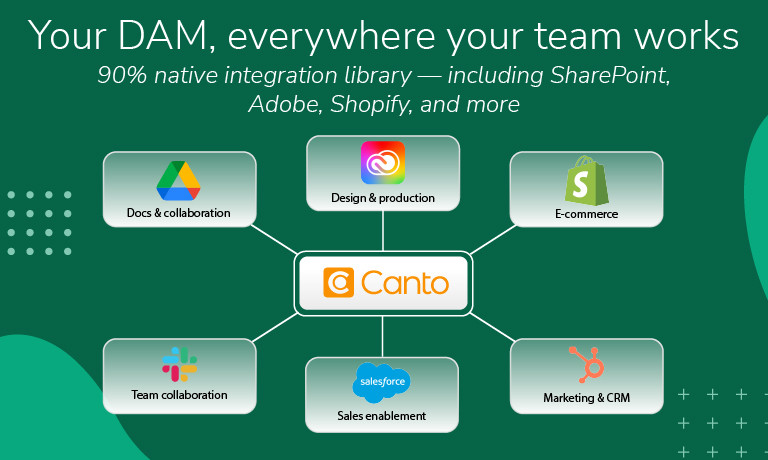
Canto DAM is built around the full content lifecycle. AI Visual Search and frame-level video discovery mean teams find what they need in seconds rather than minutes. Smart Tags and AI Library Assistant keep the library organized as it grows, without the manual overhead that compounds alongside content volume. Brand governance tools including asset expiration, Digital Rights Management, watermarking, and approval workflows ensure only current, approved content reaches teams and partners. And with a 90%+ native integration library spanning Adobe Creative Cloud, Slack, Salesforce Marketing Cloud, Shopify, Amazon, and more, assets move through workflows without manual handoffs. Canto Academy adds DAM-specific training and strategy resources from day one, and for product-driven brands, Canto DAM for Products connects creative assets directly to product information and syncs with Shopify and Amazon with no separate integration to maintain.
Paired with Google Drive for document collaboration, Canto gives every part of your organization the right home for their content. Marketing teams get a true Google Drive alternative for brand asset management, without the broken searches, the outdated assets still in circulation, or the re-created work that comes from trying to run brand operations on a tool that was never built for it.
More resources
Google Drive vs. DAM frequently asked questions
Are DAM and Google Drive interchangeable?
No. Google Drive is built for file storage and document collaboration. A DAM is purpose-built to organize, govern, search, and distribute brand assets at scale, and it understands what is visually inside your content in a way Drive cannot.
Can Google Drive be used as a DAM?
It can store images and videos, but it has no visual search, no brand governance controls, no asset expiration, and no approval workflows. Teams that use Drive as a DAM typically end up with folder structures only one person understands and no reliable way to know what content is actually in use.
What does a DAM do that Google Drive cannot?
A DAM finds assets by what’s visually inside them, something Google Drive’s filename-only search cannot do. It also governs usage through expiration dates, watermarking, and DRM, and keeps organization consistent through AI rather than relying on one person’s folder discipline, none of which Google Drive offers natively.
Why do teams switch from Google Drive to a DAM?
Usually, it is a rebrand that surfaces how disorganized the library has become, a new team member who cannot find anything, or a growing volume of video that Drive has no way to search. Teams switch because they outgrow what Google Drive was built to do.
Is there a Google Drive alternative built for marketing teams?
Yes. DAM platforms like Canto are purpose-built for marketing and creative teams managing brand assets at scale. Canto integrates with GoogleDrive, so teams can use it for brand assets while keeping Drive for document collaboration.
