Glossary
Brand asset library: The complete guide
What is a brand asset library?
A brand asset library is the single, organized home for your approved brand files: logos, fonts, campaign photography, templates and guidelines. It gives everyone one place to find the current version of anything.
Every email, ad, deck and landing page then looks like it came from the same company.
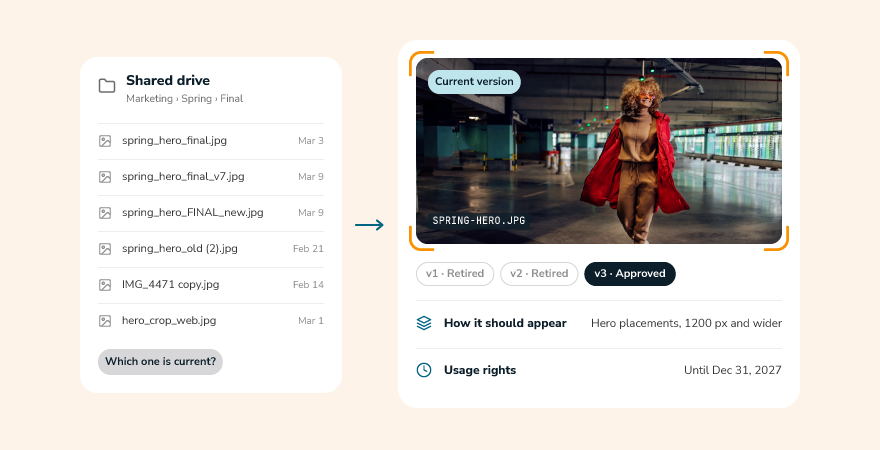
You may also hear it called a brand library or digital asset library. Whatever the name, the job is the same: replace scattered folders, old email attachments and files named final_v7 with one place everyone trusts. Marketing uses it daily, and sales reps, agencies, regional offices and partners rely on it for on-brand materials without waiting on a handoff.
Most teams build one inside a digital asset management (DAM) platform, which adds the search, permissions and sharing a basic folder can’t. A good library shows people which version is current, who can use it and how it should appear.
New to DAM? Start with our digital asset management glossary.
What belongs in a brand asset library?
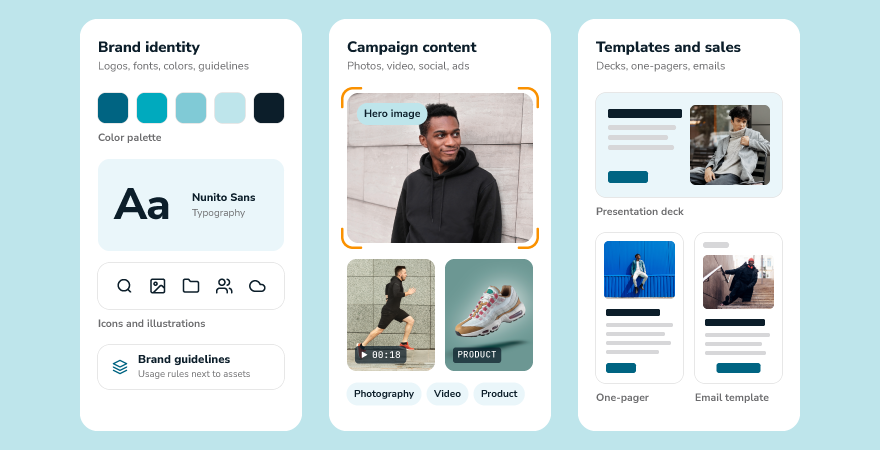
Think of your brand asset library as everything someone needs to represent your brand correctly without asking for help. That goes well beyond the logo. The most useful libraries hold three groups of content: the assets that define your identity, the content you create with them and the materials that put your brand in front of customers.
Brand identity assets
These are the building blocks every other asset depends on. Keep them in every approved format so nobody has to convert a file or guess which one to use.
- Primary and secondary logos in each approved color version and file type
- Fonts and typography files
- Color palettes with exact values for screen and print
- Icons, illustrations and graphic patterns
- Brand guidelines that explain how all of it fits together
Marketing and campaign content
This is the content your team produces most often and reuses most. A library makes sure the best of it doesn’t disappear into a campaign folder once the launch is over.
- Campaign photography and video
- Social graphics and ad creative
- Product images and lifestyle shots
- Web banners and email headers
- Executive headshots, press kits and boilerplate copy
Templates and sales materials
Templates turn brand rules into something anyone can use. They let teams outside the creative department build on-brand content without starting from a blank page.
- Presentation decks and one-pagers
- Sell sheets and product collateral
- Email and social post templates
- Event signage and trade show graphics
- Letterhead, business cards and other stationery
Key features of a strong brand asset library
A shared folder can store brand files. A brand asset library helps people find, trust and use them. These features make the difference, and they’re worth checking whether you’re building a library from scratch or fixing one that has grown messy.
Central storage organized the way teams work
Put Put every approved asset in one place and organize it around how people look for content: by campaign, product, region, asset type or team. Folders, albums and collections give you structure, and metadata gives you flexibility, so one asset can show up wherever it’s needed without being copied.
Search that works for everyone
Not everyone knows what a file is called. A strong library lets people search by keyword, filter by details such as file type or usage rights, and find images by what they show. AI-assisted search and tagging take much of the manual work out of this, which matters as the library grows.
Version control and expiration dates
Version control for digital assets shows the current approved version and keeps outdated files out of circulation. Expiration dates add a safeguard for licensed photos, seasonal campaigns and anything with limited usage rights, so expired content doesn’t end up in front of customers.
Role-based access and permissions
Not every asset is meant for every audience. Permissions let you decide who can view, download, upload or edit, so an agency sees campaign files while a new hire sees the logo pack and the templates they need.
Brand guidelines next to the assets
Guidelines work best when people see them while they pick a file. Placing usage rules, color values and do and don’t examples alongside the assets answers questions at the moment they come up, not in a PDF nobody opens.
Sharing and distribution tools
A library earns its keep when content leaves it correctly. A brand portal, share links and publishing tools put current files in front of partners, retailers and regional teams without email attachments that go stale.
Usage insight and integrations
Reporting shows which assets get downloaded and used, so you can retire what’s ignored and make more of what works. Integrations with design tools, content management systems and e-commerce platforms bring the library to the places where people already work.
Benefits of a brand asset library
The case for a brand asset library comes down to time, consistency and risk. When approved content is easy to find and hard to misuse, every team gets more done and the brand looks the same everywhere it shows up.
A consistent brand across every channel
When everyone pulls from the same source, brand consistency becomes the default: the logo on a partner’s website matches the one on your latest deck. A single library removes the guesswork that leads to stretched logos, off-brand colors and outdated claims.
Faster campaigns and less rework
Teams spend less time hunting for files and rebuilding assets that already exist. Launches move faster because the hero images, templates and approved copy are ready when the brief lands.
Self-service for non-creative teams
Designers stop fielding requests for the latest logo or a slide template. Marketing, sales and regional teams find on-brand materials themselves and use approved templates without waiting on the creative team. Creative teams get time back for the work only they can do.
Smoother collaboration with agencies and partners
Give agencies, freelancers and partners access to exactly what they need, no more. Everyone works from the same current files, which cuts down on back-and-forth over versions and approvals.
Lower brand and rights risk
Expiration dates, usage rights and version control reduce the chance of publishing something outdated or unlicensed. If a logo changes or a license lapses, you update the library once instead of chasing every copy.
Scale for growing and global teams
As teams, markets and content volume grow, a shared library keeps standards steady. Regional teams can adapt content for their audience while still starting from approved assets.
How to build a brand asset library
You don’t need to launch with every asset on day one. Start with the files people ask for most, build a structure that can grow and set up habits that keep the library current. These six steps work for teams of any size.
1. Audit what you already have
Collect brand assets from shared drives, inboxes, agency folders and individual laptops. Sort them into three groups: keep as is, update and retire. Expect to find duplicates, outdated logos and files nobody can identify. That’s normal, and it’s the reason the library is worth building.
2. Decide what counts as approved
Only approved assets belong in the library. Agree on who signs off on new content and who owns each category, such as logos, photography and templates. Clear ownership keeps the library trustworthy because someone is accountable for it.
3. Organize and tag for how people search
Build a folder or collection structure that matches how your teams think about content, then apply metadata management so assets can be found in more than one way. Set simple naming conventions, add descriptions and usage notes, and include alt text for images. AI-assisted tagging can speed this up, but a person should still review what it adds.
4. Set access and approvals
Decide who can view, download, upload and edit. Match permissions to roles, and add an approval step so new or updated assets get reviewed before they appear in the library. Internal teams, agencies and partners usually need different levels of access.
5. Add guidelines and share the library
Place brand guidelines next to the assets they govern, then share the library with the people who will use it. Branded portals and share links give agencies and partners a clean view of what’s relevant to them, and a short walkthrough helps teams know where to look first.
6. Keep it current
A library earns trust by staying accurate. Review it on a regular schedule, retire expired or superseded assets and track which files get used. When a rebrand or product launch lands, update the library first so every team starts from the same place.
Brand asset library vs. DAM
A brand asset library is the outcome. DAM is the system that makes it work. Think of the library as the collection of approved brand content and the DAM as the platform that organizes, protects and delivers it. Brand asset management is the practice of keeping that library organized, approved and current. Many teams start with a shared drive, then move to a DAM when search, permissions and version control start to strain.
| Need | Shared drive or folder | Brand asset library in a DAM |
|---|---|---|
| Finding assets | Relies on folder names and memory | Search by keyword, metadata and image content |
| Version control | Old and new files sit side by side | Current approved version is easy to see and old versions are retired |
| Access | Often all or nothing | Role-based permissions for each audience |
| Brand guidance | Guidelines live in a separate file | Guidelines sit next to the assets |
| Sharing outside the company | Email attachments and links that go stale | Portals and share links that point to current files |
| Usage rights | Tracked in spreadsheets, if at all | Rights details and expiration dates attached to the asset |
| Visibility | Little or no insight into use | Reporting on downloads and asset use |
If your team is hunting for files, rebuilding assets that already exist or sending partners outdated logos, those are signs a DAM-powered library will pay off.
Why choose Canto for your brand asset library
A brand asset library only works when people can find what they need and trust what they find. Canto has led DAM for more than 35 years, and Canto DAM is where marketing, content and creative teams organize, share and update brand content with every version kept current.
It’s also an active DAM, which means it puts your content to work instead of only storing it. AI digital asset management handles the tagging, searching and sorting, so your team spends less time hunting for files and more time using them.
Want to see what Canto can do for you?
Take the product tour or book a demo to see it in action
Brand asset library frequently asked questions
What is the difference between a brand asset library and a DAM?
A brand asset library is the collection of approved brand content, and DAM is the system that stores, organizes and delivers it. You can keep a basic library in a shared drive, but a DAM adds search, permissions, version control and sharing tools that make the library easier to trust and use at scale.
What should be in a brand asset library?
Start with logos, fonts, color palettes and brand guidelines. Add campaign photography, video, templates, sales materials and anything else your teams reuse often. If people regularly ask for it, it belongs in the library.
How do you create a brand asset library?
Audit the brand files you already have, decide what counts as approved and organize assets with folders and metadata. Then set permissions, add guidelines and share the library with your teams. Review it regularly so it stays current.
Who should have access to a brand asset library?
Anyone who creates or uses brand content, including marketing, sales, creative, regional teams, agencies and partners. Access doesn’t have to be equal. Role-based permissions let you show each group only what’s relevant and limit who can upload or edit.
How often should you update a brand asset library?
Update it whenever your brand changes, such as a rebrand, a new product launch or a new campaign, and review it on a set schedule, such as quarterly. Retire expired and superseded assets as you go. Assigning an owner to each asset category keeps this from slipping.
Is a brand asset library the same as a brand library or a digital asset library?
In most cases, yes. Brand library, brand asset library and digital asset library all describe a central home for brand content, though “digital asset library” can sometimes cover a wider range of files.

Start with Canto
Make more of your content.
Bring your assets, teams, and workflows together. See what’s possible with Canto.