
Information optics: How to view video metadata

Metadata may seem complex, but it’s accessible to anyone looking to understand the information embedded within video files. Video metadata encompasses a wide range of details — from technical specifications like resolution and codecs to administrative data such as creation dates, camera settings, and location information (including EXIF data).
Understanding and accessing this metadata is crucial for improving video organization, enhancing SEO performance, protecting privacy, and enabling efficient digital asset management.
This guide shows you how to view, interpret, and use video metadata effectively. Whether you’re a content creator, marketer, or casual user, mastering media metadata opens up new possibilities for managing, optimizing, and sharing your videos effectively in today’s digital world.
What is video metadata?
Video metadata is the information associated with a digital video file. It plays a key role in video SEO and digital asset management, and is essential for organizing, describing, and tracking media files, footage, and other data. These attributes help teams organize, categorize, and improve the searchability of video search results.
Video file metadata generally falls into two categories:
| Type | What it includes |
|---|---|
| Technical metadata | Resolution, bit rate, file format, codecs, color space, audio streams, encoding method |
| Administrative metadata | Camera used, creation date, file creator, upload date, GPS location, device identifiers |
Metadata can also include capture details, names of people in the footage, and the presence of external devices such as microphones — details that are valuable for scene analysis and security. Transcripts and closed captions provide crawlable text for search engines and meet accessibility standards.
Modern asset management systems use AI-driven metadata to automate tagging and generate real-time insights. Container formats like AVI and MP4 contain metadata about codecs, video, and audio streams, and the most popular metadata format for video is XMP (Extensible Metadata Platform).

How do I view a video’s metadata?
There are a few methods depending on the file type and the system you’re using. Many tools support a wide range of file formats and make it easy to extract metadata by letting you drag and drop files directly into the interface. Some online tools do not save or share your uploaded files, ensuring your privacy when viewing metadata.
Video files: Using a metadata viewer
Many tools make it easy to locate and view metadata without advanced computer knowledge. Some metadata viewers also allow users to remove metadata from their files for privacy or organizational purposes.
| Tool | Download required | Best for | File support |
|---|---|---|---|
| MediaInfo | Yes | In-depth technical metadata, multi-platform use | Video, audio, and other media |
| Wondershare UniConverter | Yes | Users who prefer a modern, polished interface | Video |
| Metadata2go | No (browser-based) | Quick metadata checks with no install | Video, images, documents |
Additionally, video editing software and specialized metadata editor tools can also be used to edit a video’s metadata directly.
Video files: Manual approach for Windows
Here’s how to view video file metadata on Windows without third-party software:
- Locate the video file whose metadata you wish to view.
- Right-click the file and select “Properties.”
- Under the “General” tab, you’ll see basic metadata, such as file size and date created.
- Click the “Details” tab to view additional information, including title, length, and frame rate.
Video files: Manual approach for Mac
- Locate the video file whose metadata you wish to view.
- Right-click and select “Get Info.”
- If you have specific media software that plays your video files, you may be able to load the files into those programs and view metadata (depending on the system).
Metadata on videos uploaded to YouTube: Video details page
YouTube metadata differs from metadata stored in a local video file because YouTube generates and manages its own metadata when a video is uploaded. Using structured data formats like JSON-LD to provide metadata for videos embedded on your site can further enhance search engine indexing and rich snippets. Here’s how to check it:
- Navigate to the YouTube video you want to find metadata for.
- Underneath the video, you’ll find basic metadata, including the title, uploader, and upload date.
- To dig deeper, right-click next to the video player and select “View page info.” This will provide further details, including the hyperlink and keyword tags. These keywords, along with other descriptive metadata like titles, descriptions, and tags, help improve the video’s discoverability and search engine indexing.
Hidden data in videos
Every video file contains metadata that travels with it. This behind-the-scenes information can include camera settings such as shutter speed, aperture, and focal length, as well as the date and location the video was recorded.
With tools like an EXIF viewer or a dedicated metadata viewer, you can access not just the obvious file details, but also the technical information that can affect how your video appears in search results and is handled by social media platforms, which is especially important when weighing DAM vs. MAM for managing rich media.
For example, embedded location data may influence how platforms categorize your content, and camera settings can be useful reference points for other creators, mirroring the broader role of effective digital asset management. If privacy is a concern, knowing what is stored in your files means you can remove sensitive details before sharing.
Whether you are sharing videos casually or managing a large content library, understanding the metadata in your video files gives you greater control over your content’s digital footprint and lays the groundwork for a more strategic media asset management approach.
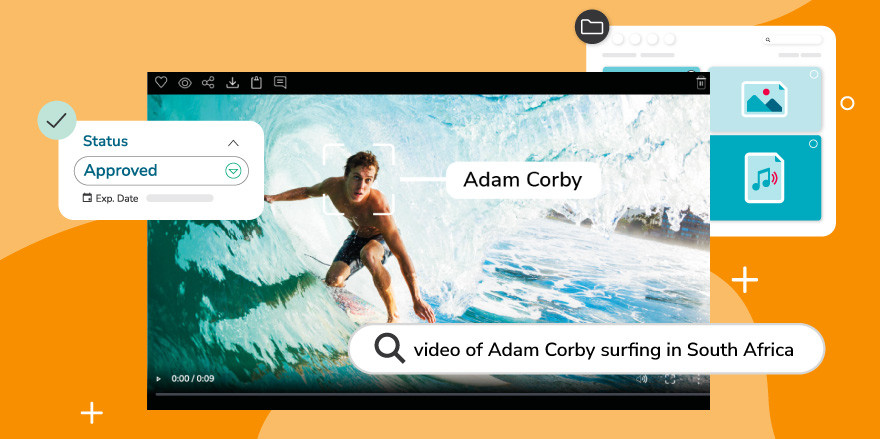
What can I learn from a video solely from its metadata?
Metadata in images has long been used to extract detailed information — including precise locations — and the same is true for video files, especially when you apply metadata management and tagging best practices. Using metadata alone, you can determine:
- The camera model used to shoot the video
- The location where it was filmed (if GPS data is present)
- The date and time of recording
- The file size and encoding details
- The editing software used in post-production
Tracking key metadata elements is also essential for improving search visibility and for informing a phased digital asset management implementation that supports video workflows. By tracking structured data and key moments, you can ensure your video content is accurately indexed and easily discoverable by search engines. Structural metadata can also mark chapters or scenes within a video, making it easier to navigate and manage content within video libraries.
The importance of video-structured data
Structured data is the foundation of effective video SEO, supporting discoverability, ranking, and indexing. It helps search engines understand the content and context of your video files, and when implemented correctly, it enables them to generate rich snippets — enhanced descriptions that can appear alongside your video in search results, including thumbnails, descriptions, and timestamps.
Using open standards such as JSON-LD to embed structured metadata on your site ensures interoperability and seamless integration with various systems. JSON-LD simplifies the process of providing search engines with comprehensive video information, such as transcripts, thumbnails, and descriptions.
Structured data can also help your video appear in specialized search features, such as video carousels or the dedicated video tab, driving more traffic to your page and improving user engagement, much as well-optimized YouTube metadata strategies do on the platform itself. Keeping video titles concise and informative and avoiding keyword stuffing are both important practices for maximizing these benefits.
Can I edit video metadata with video editing software?
The ability to edit metadata depends on your operating system and the media software you have installed. Tools like Windows Media Player and iTunes both offer options to change the metadata of video files.
If you only need to make minimal changes and prefer not to install dedicated software, you can right-click a video file, select “Properties,” click the “Details” tab, and click the “Value” header beneath the field you want to change to enter new information.
Note: Some metadata fields may not be editable depending on the file format or the software you are using.
Take control of your media metadata
As you can see, there is no single way to view or manage video metadata. With numerous tools and approaches available, there is little reason to remain in the dark about the information embedded in your files — and the more intentional you are about metadata, the more discoverable and organized your video content becomes.
For teams managing large libraries of video content, a digital asset management (DAM) platform is one of the most effective solutions. A digital asset management platform stores, organizes, searches, manages, and distributes your brand’s digital assets — keeping your metadata structured, consistent, and accessible across your entire team.
Canto is one example of a cloud-based DAM platform designed to support this at scale. It allows teams to add, edit, and search metadata across a video library, making it easier to find and manage assets at scale when paired with digital asset management best practices.
For organizations handling large volumes of video content, a DAM can be a practical next step beyond the manual, single-file approaches covered in this guide, especially when you follow a structured process to select the right DAM system.
Frequently asked questions about video metadata
What is video metadata, and why does it matter?
Video metadata is all the descriptive, technical, and administrative information associated with a video file — such as its title, description, file format, resolution, creation date, camera settings, and GPS location. It matters because search engines like Google rely on this information to index and rank video content. Without proper metadata, your videos are significantly harder to discover in search results, on platforms like YouTube, and within digital asset management systems.
What are the different types of video metadata?
There are three main types of metadata for videos, and in larger organizations, a digital asset manager often oversees how these are applied and governed:
- Descriptive metadata — Information that identifies what a video is about, including the title, description, tags, and transcript. This is the most important type for SEO.
- Technical (or source) metadata — File-level details captured automatically, such as codec, resolution, bit rate, frame rate, and file size.
- Administrative metadata — Information about how and when the video was created, including the camera used, file creator, creation date, copyright data, and access permissions.
How does video metadata affect SEO?
Metadata directly impacts how search engines understand, index, and rank your content. Well-optimized titles, descriptions, and tags signal relevance to search queries, while structured data formats like JSON-LD help generate rich snippets — the enhanced results in Google that display thumbnails, descriptions, and timestamps. Videos with accurate, keyword-rich metadata are more likely to appear in video carousels, the Google video tab, and at the top of YouTube search results. Adding transcripts and closed captions further improves SEO by providing crawlable text directly tied to your video content.
How do I view the metadata of a video file?
There are several ways to view video metadata depending on your setup:
- On Windows — Right-click the file, select “Properties,” then click the “Details” tab.
- On Mac — Right-click the file and select “Get Info.”
- Using free tools — Metadata2go.com lets you upload a video in your browser and view its metadata instantly, with no download required.
- Using dedicated software — MediaInfo is a free downloadable program that displays in-depth metadata, including audio tracks, codecs, and color space.
Can video metadata include location data?
Yes. If a video was recorded on a device with GPS enabled — such as a smartphone — the coordinates of where it was filmed may be embedded directly in the file. This location data can be viewed using a metadata viewer or EXIF reader. It is worth checking for GPS data before sharing videos publicly, as this information travels with the file and may reveal more than intended.
How do I edit or remove video metadata?
You can edit basic metadata on Windows by right-clicking a video file, selecting “Properties,” clicking the “Details” tab, and entering new values under the relevant fields. On Mac, some metadata can be adjusted through compatible media players. For more comprehensive editing — including removing GPS data or changing codec information — dedicated tools like MediaInfo, Wondershare UniConverter, or video editing software such as Adobe Premiere or Final Cut Pro provide more control. Note that not all metadata fields are editable depending on the file format.
Does social media strip metadata from uploaded videos?
Yes, most social media platforms — including Facebook, Instagram, and TikTok — automatically strip technical and EXIF metadata from video files upon upload. This means the original camera settings, GPS location, and device information embedded in the file are typically removed. YouTube is a partial exception, as it retains and uses its own layer of metadata (title, description, tags, upload date) that you provide at the time of upload. If preserving original metadata is important, always keep a local copy of the original file.
What is the best metadata format for video SEO?
For videos embedded on a website, JSON-LD is the recommended structured data format. It is endorsed by Google and can be added to the <head> of a web page to provide search engines with detailed information about your video, including its title, description, thumbnail URL, upload date, and duration. This structured data enables rich snippets in search results and increases the likelihood that your video appears in specialized search features, such as video carousels. For video files themselves, XMP (Extensible Metadata Platform) is the most widely used embedded metadata standard.